Field guide
How to use AgriAuditor
A short walkthrough for screening what a field may support next season. The useful result is a transparent shortlist with assumptions you can challenge, not an instruction to plant without local checks.
Quick start
Choose location -> add assumptions -> run audit -> expand a crop card. Fill optional inputs when you have evidence; do not invent precision just to complete the form.
The audit in seven steps
- 1
Choose a location
Search for a place or coordinate, or click the map. If you draw a field, the audit uses its centre for weather and its area for the farm calculations.
- 2
Choose the analysis mode
Current Season shows recent conditions, Historical uses the latest complete reanalysis window, and Forecast adds the available next-season ensemble outlook. Climate guidance is a scenario layer, not a planting guarantee.
- 3
Add the assumptions you know
Farm size changes scale, currency changes presentation, and the optional business panel tests minimum profit, owner wage, overhead, available capital, payback and contingency assumptions. Leaving a field blank keeps the platform baseline.
- 4
Add field evidence when you have it
The soil override panel can replace mapped pH, nitrogen and organic-carbon values with your own results. A local soil test is stronger evidence than a mapped estimate, but still needs agronomic interpretation.
- 5
Run the audit
Select Run Audit after the location and assumptions are ready. The engine compares crop profiles with soil, climate, management burden and editable economic inputs. It screens options; it does not certify a crop or predict your farm result.
- 6
Use the results controls
The filter shutter can be opened or collapsed from the leaf tab. Category chips, season, search and sort controls change the displayed shortlist without silently changing the underlying audit.
- 7
Expand a crop card
Open a card to inspect biological fit, limiting factors, water and soil context, commercial hurdles, downside scenarios and the assumptions behind the financial view. Check buyer access, labour, machinery and irrigation before committing capital.
What to look for on screen
These examples are owned AgriAuditor screenshots. They show the controls and evidence panels that matter when you challenge an audit's assumptions.
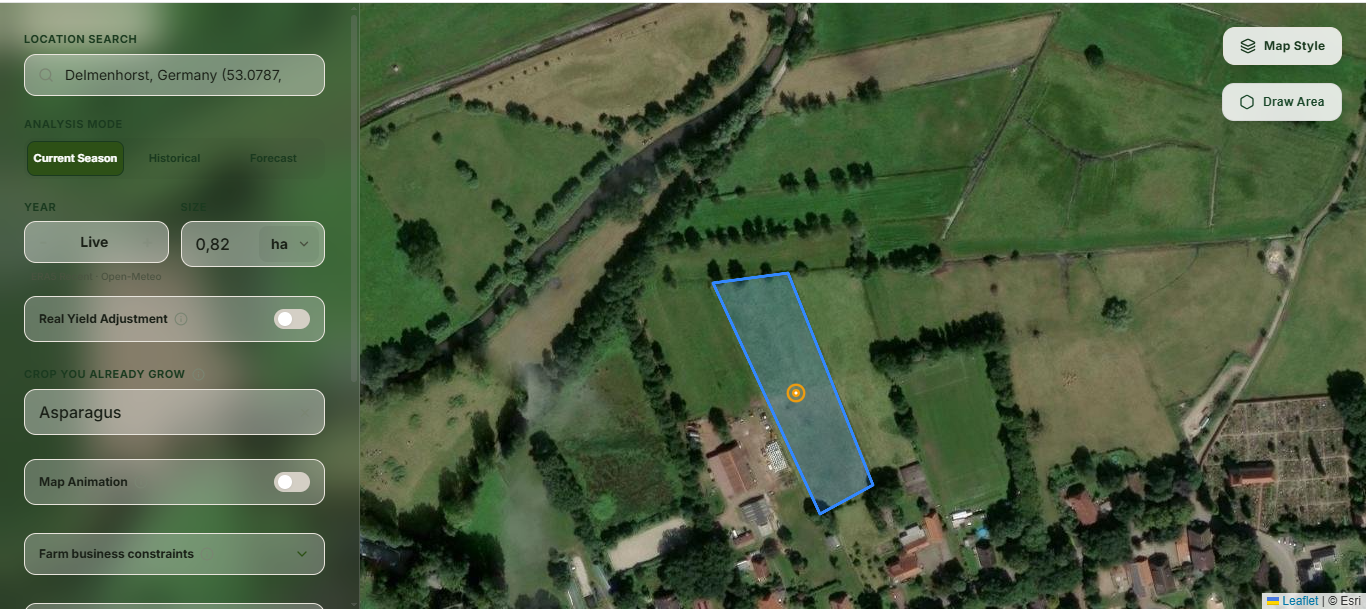
Search for a place, draw the field boundary and confirm the area used for the audit.
Screenshot: AgriAuditor
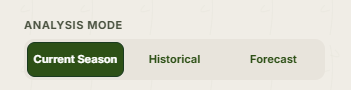
Current Season, Historical and Forecast change the climate evidence shown in the audit.
Screenshot: AgriAuditor
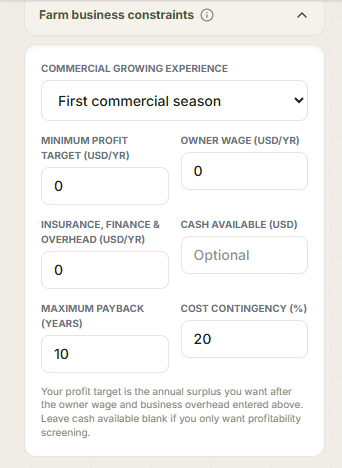
Enter only the commercial limits you can support with farm evidence: profit target, owner wage, overhead, capital and payback.
Screenshot: AgriAuditor
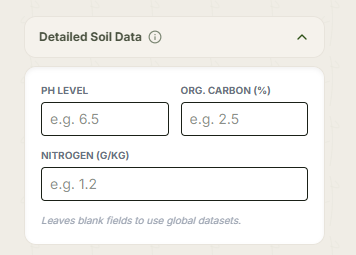
Use a representative soil test to replace mapped pH, organic-carbon or nitrogen estimates when available.
Screenshot: AgriAuditor
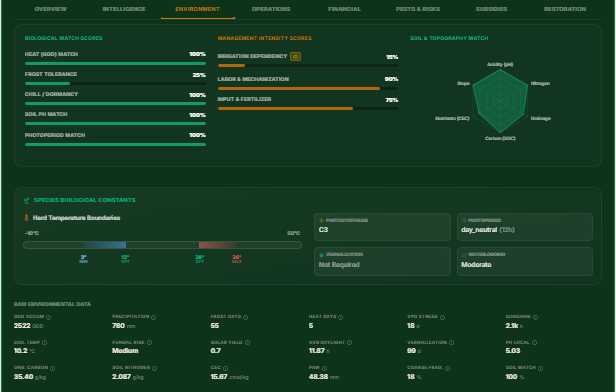
The environment tab shows which biological, management and soil signals support or limit a crop.
Screenshot: AgriAuditor

Open the leaf tab to filter the shortlist by category, search, season and sort lens without rerunning the audit.
Screenshot: AgriAuditor
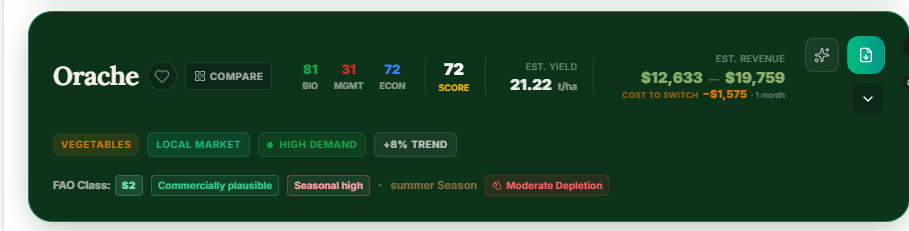
The closed card is a compact comparison view for fit, management, economics and the main warning badges.
Screenshot: AgriAuditor
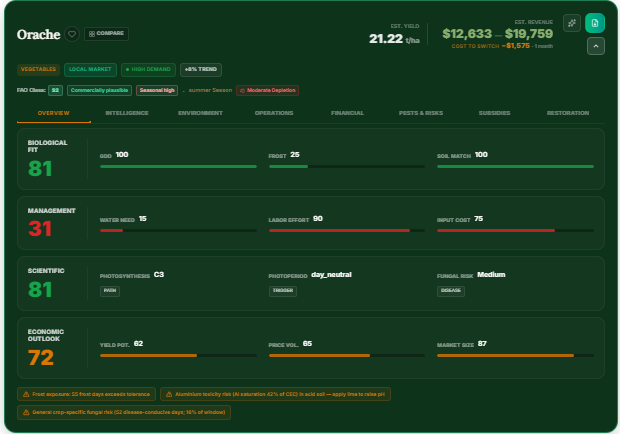
Open a card to inspect the evidence behind its score and the limiting factors before making a field or buyer decision.
Screenshot: AgriAuditor
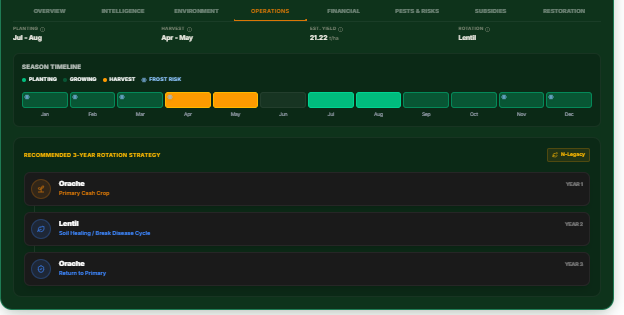
Review planting and harvest timing, labour and input burden, and the suggested rotation sequence.
Screenshot: AgriAuditor
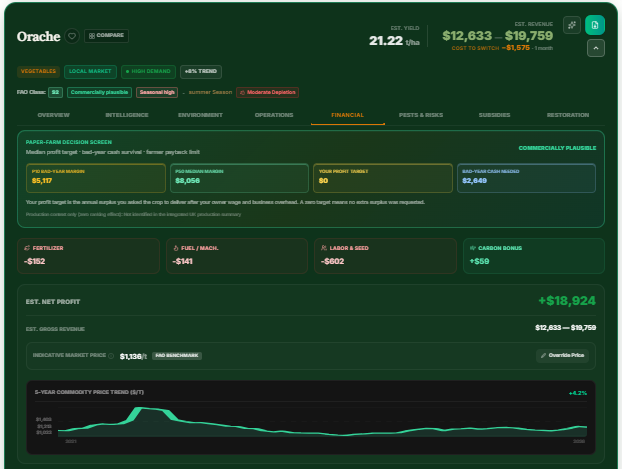
Treat revenue, costs and price trends as editable assumptions and public benchmarks, not guaranteed farm-gate outcomes.
Screenshot: AgriAuditor
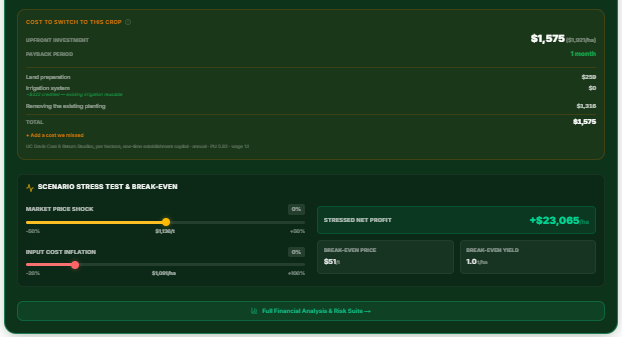
Check establishment capital, payback, break-even price and how input or market shocks change the margin.
Screenshot: AgriAuditor
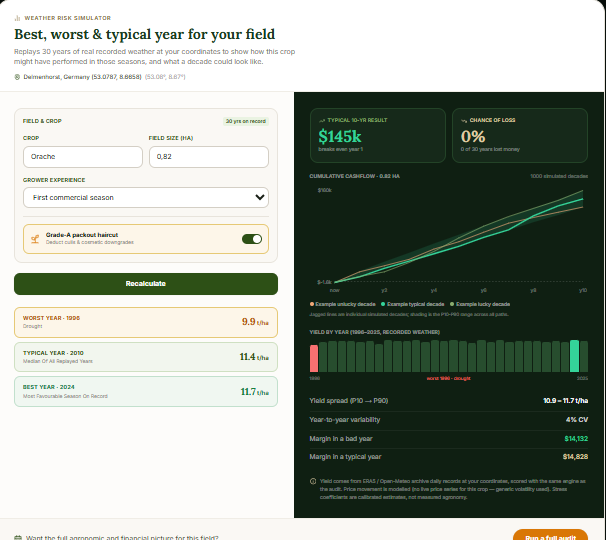
Use the historical scenario view to see a range of outcomes; a scenario is not a promise about next season.
Screenshot: AgriAuditor
Frequently asked questions
Do I need a soil test?
Not to explore the tool, but mapped soil layers are screening estimates. Use a representative local laboratory or field test before making a material planting, nutrient or infrastructure commitment.
What changes when I enter a business constraint?
The commercial screen tests the crop against that requirement. For example, a minimum annual profit or available-capital limit can flag a biologically suitable crop as commercially cautious.
What does the filter shutter do?
It shows or hides category, season, search and sort controls. It is a display control, so closing it does not remove crops from the audit.
Are the prices local farm-gate prices?
No. They are public benchmark inputs or editable assumptions. Confirm the buyer, grade, contract, transport and local farm-gate price before using the economics.
Can I treat the top crop as a recommendation?
Treat it as a starting shortlist. Compare the assumptions, downside cases and operational requirements with your own records and a local agronomist or buyer.